Email is a huge part of our day-to-day existence. For work, studies, or private use, we use Gmail to remain connected. But sometimes significant emails do not show up in the inbox. They go straight into the Junk Folder or Spam Folder. It perplexes and annoys many. Why does Gmail do that? How to cope with it? And most importantly, how can you not miss important emails? This tutorial will show you all of this in plain terms.
What is Gmail’s Junk Folder?
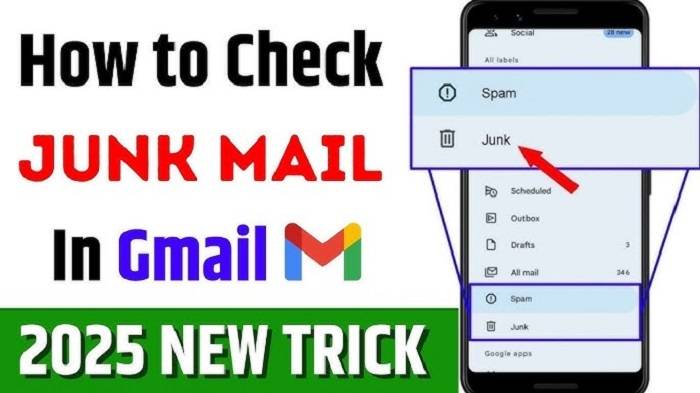
Gmail Junk Folder is also known as the Spam Folder. It is actually a folder where Gmail automatically sends emails that are of suspicious nature. They are usually emails from unknown senders, advertisements, spams, or anything else which may be threatening. Gmail uses intelligent filters and machine learning in order to decide which emails to send to your inbox and which to send to junk.
Imagine it as a security gate watchman. The watchman lets familiar visitors and refuses unfamiliar visitors. The Gmail spam filter works the same. But just like a watchman may get malfunctioned, so may Gmail send good mail to garbage. Therefore, one must learn how to deal with this folder.
Why Emails Go to the Junk Folder
Gmail flags an email as spam for several reasons:
- Unfamiliar sender – If the sender of the email is an unknown address that you have never used, Gmail may mark it as a risk.
- Spam email – Too many URLs, foreign formatting, or “win money” or similar phrases typically end up in spam.
- Phishing attempt – Gmail prevents hackers from trying to steal passwords or any other confidential data.
- Mass mailings – Mass marketing efforts or mailings are sure to be detected.
- User reports – If many users report a sender as spam, Gmail will automatically start sending them to junk.
These are designed to assist you, yet sometimes even legitimate emails are intercepted.
How to Find the Junk Folder in Gmail
Most individuals don’t even know where the junk folder is located. It is simple:
- Open Gmail.
- Scroll down on the left-hand side. Locate Spam from there. If you cannot see it, click More. You will view all the messages there.
- Click Spam to launch the spam folder.
This is where all the messages Gmail marked as not safe are stored. Each of them has a note that states it was marked as spam.
How to Retrieve Emails from the Junk Folder
Sometimes an important message from your friend, client, or boss ends up in junk. Give this a try:
- Open the email in the Spam folder.
- Tap on “Not Spam” at the top of the screen.
- Gmail will move the message to your inbox.
By doing so, Gmail also learns how to let similar messages pass by not going into junk later on. It’s like you’re training the system.
If it is from somebody you trust, you can even make them a contact as well. Emails received from contacts you have saved have less possibility to be sent to the junk.
Blocking Emails from the Junk
There are a couple of things that you can do so that Gmail does not send you important mail to the junk folder:
- Add senders as contacts – Save useful email addresses.
- Check spam settings – In Gmail settings, make filters so that there are fewer mistakes.
- Use filters – Create a filter to always send emails from a particular address directly to the inbox.
- Mark as Not Spam – The more you customize Gmail, the smarter Gmail becomes.
These behaviors train Gmail your way gradually.
How Long Emails Stay in the Junk Folder
What you need to know is that Gmail never retains spam. Spam mail within the spam folder is automatically deleted after 30 days. Therefore, if you never clean your spam folder occasionally. Then you can lose important messages unknowingly.
That. That’s why it’s a good habit to review the spam folder from time to time, say, every other day. Although there may be plenty of garbage there, you may be able to recover an important message that’s otherwise lost.
Why You Should Never Ignore the Junk Folder
There are individuals who think that the junk folder is useless. But what if ignoring it might cause the following:
- Missed opportunities – Job offers, business opportunities, or school announcements occasionally find their way into spam.
- Hidden family emails – Emails from overseas relatives might become labeled as spam whenever they send them out from new domains.
- Subscription errors – Receipts or newsletters that you signed up for might end up in spam by mistake.
So most junk mail is actually spam, but not necessarily always. It only takes a few minutes to sort through and will spare you aggravation.
The Difference Between Junk and Promotions
In Gmail, you will discover that there’s another tab named Promotions. Some mistake it for junk. They are not, though:
- Promotions Tab – Has promotion emails like shopping deals, advertisements, and offers. They’re not bad, they’re just less important.
- Junk Folder (Spam) – Suspicious or harmful mails which Gmail is trying to keep away from you.
Knowing the difference makes it easier for you to work with your emails.
Do You Remove Junk Emails Manually?
You can actually do that. If you don’t care about losing spam build-up, you can also delete it manually:
- Open the Spam folder.
- Click “Delete all spam messages now“ on top.
- All trash will be deleted instantly.
It’s an excellent way of deleting Gmail space too, as spam mail generally has large attachments.
Gmail Hints to Keep Your Inbox Clean
Keeping your trash folder tidy is really part of a greater good: your inbox organization. Some simple suggestions are:
- Unsubscribe unwanted mail – Don’t mark them as spam, but use the link to opt-out.
- Use labels – Group work, school, and personal mail into categories.
- Save old emails – Clean up your inbox by saving things you never use regularly.
- Be careful with your email address – Don’t post it on random websites. That reduces spam to start with.
The fewer spams, the less rubbish you’ll have to sort out.
Mobile Junk Folder
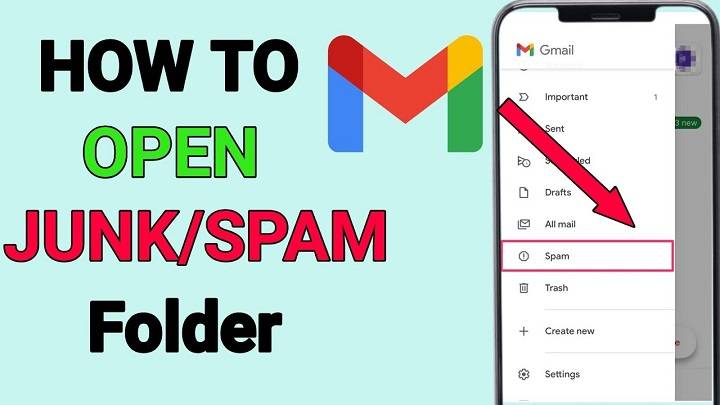
If you have the Gmail app on your phone, you can check the junk folder too easily:
- Open the Gmail app.
- Click on the three lines in the corner.
- Scroll down to Spam.
Here you can drag emails, delete spam, or report messages as safe. Pretty much the same as the desktop application is how the app operates.
Gmail’s spam folder isn’t a garbage pail. It is an insurance policy that protects you from scams, viruses, and an endless flow of unwanted mail. But it is not perfect. It sometimes gets the wrong mail. That is why you must sift through it every now and then, restore valuable mail, and show Gmail what matters to you.
If you understand how the junk folder operates. Then you can have confidence that you will never miss any key mail again. You will also feel more secure in the assurance. That Gmail is automatically filtering behind the scenes to keep your inbox tidy.